I've been doing quite a bit of "proper" OOP coding in PHP lately and made a note of common pitfalls I came across. This list is not a complete run-down of what's wrong with OOP PHP. To be honest, save for these pitfalls, proper coding of PHP is actually fun.
1. Having to import every single class you use manually
In Java you say import java.util.*; where the asterisk means everything in that module is available for use in this namespace. Easy to see what's going on and a real timesaver. While using standard PSR-0 autoloading conventions, PHP doesn't have library importing so for every class you use you have to import it or give the full classpath everytime you need to use it. You will often see PHP code with long lists of 'use' statements at the beginning of the file like so:
use mylib\app\util\LoremIpsumGenerator,
mylib\app\config\ConfigLoader,
anotherlib\tastyphp\orm\TastyORM,
randomlib\randomhouse\RealRandom;
2. SPL classes have to be referenced with a preceding backslash
Instead of the PHP engine doing a simple search to find a class, first in the namespace of the file, then in the Standard PHP Library namespace, you have to delimit an SPL class with a backslash every time you use it. Why can't I just say "new Exception()" instead of "new \Exception()"? Why do I have to use a backslash everywhere I use an SPL class? It's totally unnecessary and becomes annoying to code and irritating to debug
/**
* Yes, yes, I know I should use instanceof
* but I'm showing another SPL class being used
* @throws \Exception
* @param \Exception|mylib\app\exceptions\MyBaseException
* $exception
*/
public function captureMyExceptionThrowPHPException(\Exception $exception)
{
$rc = new \ReflectionClass($exception);
if ($rc->isSubclassOf('mylib\app\exceptions\MyBaseException')) throw new \Exception('My Exception: ' . $exception->getMessage());
else throw $exception;
}
3. Lack of object casting
Seriously, why can't I cast one type of object into another, even when the subject is a subclass of the object? I wish it was possible to do this: $e = (\Exception) new mylib\app\exceptions\MyBaseException('My exception'); That would save me a bit of typing and potential buggy code.
Java allows you to upcast an object, meaning a subclass can be easily converted into a parent class, but it is not possible to downcast a parent item into a subclass type. Ideally it should be able to do that but at least it is able to upcast. PHP can't cast anything except it's primitives and two complex types (int|string|float|bool|array|object).
4. Lack of proper documentation for SPL Classes on the PHP.net site
Common SPL Functions are well documented with community supplied code snippets for everything you can imagine so it's easy to copy and paste and you're done. PHP5 SPL Classes are poorly documented, which is a real shame because some crap and procedural code from the PHP4 days has now been re-implemented in a much cleaner, better and faster object oriented way. But you wouldn't know that because of the lack of information in the manual. More work needs to be put into this. More comments with usage examples are necessary. These are provided by the community so please contribute to the project with a comment or an example if you have anything helpful.
Tuesday, 1 October 2013


Sunday, 23 June 2013
Tortoiseshell-colored cats are usually female
I was reading something about cat behaviour and that reminded me of a fact that I learnt a long time ago, that almost all Tortoiseshell-coloured (black and orange patch) cats are female because of an X-linked gene. I googled it to remind myself of the genetics behind it and found an excellent page that explains it in detail: The genetics of Calico cats

Wednesday, 3 April 2013
Drupal node structure and adding/modifying values for Entity References
Nodes come with default fields which are handled by Drupal automatically and which you will not be shown or allowed to edit (usually). One field that the user can edit directly, but is mandatory and cannot be removed is the Title field. This field can be renamed to something more suitable for the Content Type of the node, but it cannot be removed. Drupal uses it for displaying the title on a page as a node is expected to have a Title and a body, and maybe some other fields. The title is also used for search indexing so it is important to choose a good title to display in search results.
Here is an example of a node I created of the Content Type "phenotype" in a project I'm working on. In Black are the fields that Drupal manages and in Green are the fields that I created.
Node: stdClass Object (
[type] => phenotype
[title] => Nespas
[field_phenotype_id] => Array ( [und] => Array ( [0] => Array ( [value] => 2 ) ) )
[field_line] => Array ( [und] => Array ( [0] => Array ( [value_format] => [format] => [value] => 129-Nespas/H ) ) )
[field_parameter_key] => Array ( [und] => Array ( [0] => Array ( [value_format] => [format] => [value] => ESLIM_001_001_004 ) ) )
[field_pipeline] => Array ( [und] => Array ( [0] => Array ( [value_format] => [format] => [value] => EUMODIC Pipeline 1 ) ) )
[field_score] => Array ( [und] => Array ( [0] => Array ( [value] => 1.0 ) ) )
[field_zygosity] => Array ( [und] => Array ( [0] => Array ( [value_format] => [format] => [value] => HOMOZYGOUS ) ) )
[field_europhenome_id] => Array ( [und] => Array ( [0] => Array ( [value] => 10475 ) ) )
[field_mp_id] => Array ( [und] => Array ( [0] => Array ( [value_format] => [format] => [value] => ) ) )
[field_mp_term] => Array ( [und] => Array ( [0] => Array ( [value_format] => [format] => [value] => ) ) )
[field_sex] => Array ( [und] => Array ( [0] => Array ( [value_format] => [format] => [value] => F ) ) )
[field_mgi_id] => Array ( [und] => Array ( [0] => Array ( [value_format] => [format] => [value] => MGI:1861674 ) ) )
[field_gene_id_ref] => Array ( [und] => Array ( [0] => Array ( [target_id] => 75729 ) ) )
[language] => und
[created] => 1364996308
[status] => 1
[promote] => 0
[sticky] => 0
[uid] => 1
[revision] =>
[comment] => 1
[menu] => Array ( [link_title] => [mlid] => 0 [plid] => 0 [menu_name] => main-menu [weight] => 0 [options] => Array ( ) [module] => menu [expanded] => 0 [hidden] => 0 [has_children] => 0 [customized] => 0 [parent_depth_limit] => 8 )
[migrate] => Array ( [machineName] => PhenotypeNode )
[changed] => 1364996308
[timestamp] => 1364996308
[log] =>
[nid] => 94430
[tnid] => 0
[translate] => 0
[vid] => 94430
)
A few things to note:
$lang = 'und';
$node = node_load($gene_node_id);
foreach ($phenotype_refs as $ref_id)
$node->field_phenotype_ref[$lang][] = array('target_id' => $ref_id);
node_save($node);
And that did it. You need to set the target_id key. So now the Gene node has a list of references to Phenotype nodes.
I hope this saves someone some time.
Here is an example of a node I created of the Content Type "phenotype" in a project I'm working on. In Black are the fields that Drupal manages and in Green are the fields that I created.
Node: stdClass Object (
[type] => phenotype
[title] => Nespas
[field_phenotype_id] => Array ( [und] => Array ( [0] => Array ( [value] => 2 ) ) )
[field_line] => Array ( [und] => Array ( [0] => Array ( [value_format] => [format] => [value] => 129-Nespas/H ) ) )
[field_parameter_key] => Array ( [und] => Array ( [0] => Array ( [value_format] => [format] => [value] => ESLIM_001_001_004 ) ) )
[field_pipeline] => Array ( [und] => Array ( [0] => Array ( [value_format] => [format] => [value] => EUMODIC Pipeline 1 ) ) )
[field_score] => Array ( [und] => Array ( [0] => Array ( [value] => 1.0 ) ) )
[field_zygosity] => Array ( [und] => Array ( [0] => Array ( [value_format] => [format] => [value] => HOMOZYGOUS ) ) )
[field_europhenome_id] => Array ( [und] => Array ( [0] => Array ( [value] => 10475 ) ) )
[field_mp_id] => Array ( [und] => Array ( [0] => Array ( [value_format] => [format] => [value] => ) ) )
[field_mp_term] => Array ( [und] => Array ( [0] => Array ( [value_format] => [format] => [value] => ) ) )
[field_sex] => Array ( [und] => Array ( [0] => Array ( [value_format] => [format] => [value] => F ) ) )
[field_mgi_id] => Array ( [und] => Array ( [0] => Array ( [value_format] => [format] => [value] => MGI:1861674 ) ) )
[field_gene_id_ref] => Array ( [und] => Array ( [0] => Array ( [target_id] => 75729 ) ) )
[language] => und
[created] => 1364996308
[status] => 1
[promote] => 0
[sticky] => 0
[uid] => 1
[revision] =>
[comment] => 1
[menu] => Array ( [link_title] => [mlid] => 0 [plid] => 0 [menu_name] => main-menu [weight] => 0 [options] => Array ( ) [module] => menu [expanded] => 0 [hidden] => 0 [has_children] => 0 [customized] => 0 [parent_depth_limit] => 8 )
[migrate] => Array ( [machineName] => PhenotypeNode )
[changed] => 1364996308
[timestamp] => 1364996308
[log] =>
[nid] => 94430
[tnid] => 0
[translate] => 0
[vid] => 94430
)
A few things to note:
- Language was left as undefined (und). If you set yours to English or something else then you need to adapt your code accordingly.
- Some of these fields are of type Entity Reference. Often, the "value" key is set, but with Entity References it is the "target_id" field that needs setting.
- The code to generate this is watchdog('phenotype', print_r(node_load($node_id), true))); And the output is accessible in the logs (Reports > Recent Log Messages).
$lang = 'und';
$node = node_load($gene_node_id);
foreach ($phenotype_refs as $ref_id)
$node->field_phenotype_ref[$lang][] = array('target_id' => $ref_id);
node_save($node);
And that did it. You need to set the target_id key. So now the Gene node has a list of references to Phenotype nodes.
I hope this saves someone some time.
Tuesday, 19 March 2013
A naturally placed DIV that responsively expands to browser window/viewport height
Have you ever seen those web applications that have a pane on the left hand side and a main body and somehow it fits it all into the size of your browser window (viewport) what ever browser/device you use or screen size you have and it doesn't show your browser's scroll bars? I'm talking about the height of the left pane and the body adjusting automatically to the height of your browser window.
Have you ever tried searching for how they do it? I tried and couldn't find a straight answer. I'm no javascript nerd so I had to figure this out the hard way with trial and error. To save any of you some time here is my solution using a little CSS and some responsive javascript (jQuery):
Scenario:
I have a typical page with a banner at the top and a navigation bar just below it, and I want my web application-style left pane and main body pane to fit into the vertical white space of the page body that is not already occupied by the banner or navigation bar. My HTML looks a little like this:
<!DOCTYPE html>
<html>
<head>
<link rel="stylesheet" href="css.css">
<script src="jquery.js"></script>
<script src="js.js"></script>
</head>
<body>
<div id="container">
<div id="banner"></div>
<div id="nav"></div>
<div id="webapp">
<div id="leftpane"></div>
<div id="mainbody"></div>
</div>
</div>
</body>
</html>
So, for this example, my main concern is the #leftpane div. If you understand the code for that, you can duplicate the approach for the #mainbody. (To be honest, I'm writing this post here before I tackle mainbody next)
The CSS for leftpane is:
#leftpane{
margin:0 auto;
float:left;
border:1px solid darkgreen;
background-color:rgba(0, 0, 150, .15);
vertical-align:top;
width:30%;
overflow-y:auto;
}
Notice there is no mention of position:absolute. That's because this example is NOT about filling the page from top to bottom with the left pane. If you want that kind of information, then google will easily find you that. Instead, what we are doing here is having the top of the div element be in its normal position, while the bottom border of the div will expand vertically depending on the size of the window/viewport. I only care about the height of the div in my example. Widths are managed with width: n% and using min-width:n px, but I will not discuss widths any further.
Anyway. How do we get the leftpane to expand according to size of the window? With a bit of Javascript (jQuery). The javascript below is responsive. When the page first loads it calls the snapLeftpane() function and resizes the leftpane and then if the user makes their window bigger or smaller, it calls the snapLeftpane() function again to resize the leftpane again.
But I set some limits. If the window becomes too small, like if the user is messing about and makes their browser window too small, then it snaps the leftpane to the minimum height allowable. And in the opposite situation, when the user has a huge window, it limits the height of the leftpane to the maximum height allowable, so the web app doesn't look ridiculously disproportioned.
Here's the javascript:
function snapLeftpane(){
var minHeight = 450,
maxHeight = 800,
wHeight = $(window).height();
var el = $('#leftpane');
if(el.length){
var top = el.offset().top + 5;
if(wHeight >= minHeight && wHeight <= maxHeight) {
el.height((wHeight - top) + "px");
console.log('naturally expanding height ' + el.height());
} else if (wHeight > maxHeight) {
el.height(maxHeight + "px");
console.log('set to max height ' + el.height());
} else if (wHeight < minHeight) {
el.height(minHeight + "px");
console.log('set to min height ' + el.height());
}
}
}
$(window).on('resize load', function(){snapLeftpane();});
And if you run this code in your browser and play around with the size of the browser window, you will see how it adjusts the height of the left pane accordingly or snaps it to the minimum height or maximum height if you make the window too small or too large. I recommend you modify the min and max heights to your preferences.
That's it. Hope this helps :)
Have you ever tried searching for how they do it? I tried and couldn't find a straight answer. I'm no javascript nerd so I had to figure this out the hard way with trial and error. To save any of you some time here is my solution using a little CSS and some responsive javascript (jQuery):
Scenario:
I have a typical page with a banner at the top and a navigation bar just below it, and I want my web application-style left pane and main body pane to fit into the vertical white space of the page body that is not already occupied by the banner or navigation bar. My HTML looks a little like this:
<!DOCTYPE html>
<html>
<head>
<link rel="stylesheet" href="css.css">
<script src="jquery.js"></script>
<script src="js.js"></script>
</head>
<body>
<div id="container">
<div id="banner"></div>
<div id="nav"></div>
<div id="webapp">
<div id="leftpane"></div>
<div id="mainbody"></div>
</div>
</div>
</body>
</html>
So, for this example, my main concern is the #leftpane div. If you understand the code for that, you can duplicate the approach for the #mainbody. (To be honest, I'm writing this post here before I tackle mainbody next)
The CSS for leftpane is:
#leftpane{
margin:0 auto;
float:left;
border:1px solid darkgreen;
background-color:rgba(0, 0, 150, .15);
vertical-align:top;
width:30%;
overflow-y:auto;
}
Notice there is no mention of position:absolute. That's because this example is NOT about filling the page from top to bottom with the left pane. If you want that kind of information, then google will easily find you that. Instead, what we are doing here is having the top of the div element be in its normal position, while the bottom border of the div will expand vertically depending on the size of the window/viewport. I only care about the height of the div in my example. Widths are managed with width: n% and using min-width:n px, but I will not discuss widths any further.
Anyway. How do we get the leftpane to expand according to size of the window? With a bit of Javascript (jQuery). The javascript below is responsive. When the page first loads it calls the snapLeftpane() function and resizes the leftpane and then if the user makes their window bigger or smaller, it calls the snapLeftpane() function again to resize the leftpane again.
But I set some limits. If the window becomes too small, like if the user is messing about and makes their browser window too small, then it snaps the leftpane to the minimum height allowable. And in the opposite situation, when the user has a huge window, it limits the height of the leftpane to the maximum height allowable, so the web app doesn't look ridiculously disproportioned.
Here's the javascript:
function snapLeftpane(){
var minHeight = 450,
maxHeight = 800,
wHeight = $(window).height();
var el = $('#leftpane');
if(el.length){
var top = el.offset().top + 5;
if(wHeight >= minHeight && wHeight <= maxHeight) {
el.height((wHeight - top) + "px");
console.log('naturally expanding height ' + el.height());
} else if (wHeight > maxHeight) {
el.height(maxHeight + "px");
console.log('set to max height ' + el.height());
} else if (wHeight < minHeight) {
el.height(minHeight + "px");
console.log('set to min height ' + el.height());
}
}
}
$(window).on('resize load', function(){snapLeftpane();});
And if you run this code in your browser and play around with the size of the browser window, you will see how it adjusts the height of the left pane accordingly or snaps it to the minimum height or maximum height if you make the window too small or too large. I recommend you modify the min and max heights to your preferences.
That's it. Hope this helps :)
Thursday, 31 January 2013
Automatically Inserting events into Google Calendar using Zend Framework
It's been a while since I posted something on this blog so here is a little problem I sorted out and wanted to share the code to help anyone out there who was planning on doing something similar.
The issue: I had an XML file containing events that needed to be entered into a Google Calendar automatically. I needed my script to log into my Google account and insert the event onto my Calendar. I looked at the Google Calendar API but didn't like it and it required PHP5.3+ according to the instructions and the host I had to get my script working on was PHP5.2. So I went to find another way of solving the problem and found the solution available in the Zend Framework Gdata module. I'm using ZF 1.12 files in my examples. Here is the Calendar documentation.
So, I downloaded the ZF zip archive, but because it's soooo huge, I only took out the files and folders that I needed and stuck them into a 'Zend' folder at the root of my src directory:
/Zend/Feed/
/Zend/Gdata/
/Zend/Http/
/Zend/Loader/
/Zend/Uri/
/Zend/Validate/
/Zend/Exception.php
/Zend/Gdata.php
/Zend/Loader.php/
/Zend/Uri.php
/Zend/Vaildate.php
/Zend/Version.php
Then we need to think how to log into Google to use its services. Zend's Google library has three ways of doing the log in.
For my purpose I did not need anything special. I didn't need a login form or to have an authentication token cookie passed through successive pages. All I needed was to have the same login credentials hard-coded into my script and used for a single script run, so I used the ClientAuth direct login method.
I created a new script at the root of my src directory.
calendar.php
<?php
//Step 1:
//Turn on error reporting so we know what's going on if it doesn't work
//Set your time zone location so your local time is correct and not the server's time zon
//Register the autoloader to automatically load the classes from the Zend Framework when needed
ini_set('display_errors', 1);
ini_set('error_reporting', E_ALL);
date_default_timezone_set('Europe/London');
require_once 'Zend/Loader/Autoloader.php';
$autoloader = Zend_Loader_Autoloader::getInstance();
$autoloader->suppressNotFoundWarnings(false);
$autoloader->setFallbackAutoloader(true);
//Step 2:
//Log into Google
//Create an instance of the Zend_Gdata_Calendar class that we use to send and receive responses from Google Calendar
$email = 'someguy@gmail.com';
$pass = 'monkey';
try {
$client = Zend_Gdata_ClientLogin::getHttpClient($email, $pass, 'cl'); //cl is to signify the calendar app is what we are using
} catch (Zend_Gdata_App_CaptchaRequiredException $cre) {
echo 'URL of CAPTCHA image: ' . $cre->getCaptchaUrl() . "\n";
echo 'Token ID: ' . $cre->getCaptchaToken() . "\n";
} catch (Zend_Gdata_App_AuthException $ae) {
echo 'Problem authenticating: ' . $ae->exception() . "\n";
}
$gcal = new Zend_Gdata_Calendar($client);
//Step 3:
//Create an event object and use the awesome PHP DateTime class to set the time and duration
$event = $gcal->newEventEntry();
$event->title = $gcal->newTitle('FNP Meeting @ 2030');
$when = $gcal->newWhen();
$startTime = new DateTime('2013-02-01 20:30:00'); //enter your start date and time here
$duration = '30 minutes'; //how long the event is
$when->startTime = $starttime->format(DateTime::RFC3339); //Only Atom-format time is allowed
$when->endTime = $starttime->modify('+' . $duration)->format(DateTime::RFC3339);
$event->when = array($when);
//insert event - the $newEvent variable contains details and the unique id of the inserted event
$newEvent = $gcal->insertEvent($event);
?>
That's it. Simple no?! I only used what I needed but the library offers more options if you care to read the documentation.
The DateTime class can be instantiated with a Unix timestamp as well. In my XML I have the time in a non-standard format and used some PHP code to split it up into individual parts and passed it to the mktime() function. By adding the @ symbol before the timestamp it makes it get parsed correctly by DateTime.
$startTime = new DateTime('@' . mktime((int)$hour, (int)$min, 0, $month, $daynum, $year));
My biggest criticism of this process of inserting events into a Google Calendar in this way is that it is SLOW! Each event insertion requires a http post to the Google server and waiting for the Google server to respond, and if it takes my server 200ms to push the event to Google servers, 100ms for Google to process my query, and 200ms to send the response back, that's 500ms, half a second to carry out a single event insertion. What if I have hundreds of things to insert... sorry, you have to do them one by one - there is no bulk insert API. The alternative is to use some kind of "HTTP multi-threading" approach since PHP doesn't do multi-threading.
The issue: I had an XML file containing events that needed to be entered into a Google Calendar automatically. I needed my script to log into my Google account and insert the event onto my Calendar. I looked at the Google Calendar API but didn't like it and it required PHP5.3+ according to the instructions and the host I had to get my script working on was PHP5.2. So I went to find another way of solving the problem and found the solution available in the Zend Framework Gdata module. I'm using ZF 1.12 files in my examples. Here is the Calendar documentation.
So, I downloaded the ZF zip archive, but because it's soooo huge, I only took out the files and folders that I needed and stuck them into a 'Zend' folder at the root of my src directory:
/Zend/Feed/
/Zend/Gdata/
/Zend/Http/
/Zend/Loader/
/Zend/Uri/
/Zend/Validate/
/Zend/Exception.php
/Zend/Gdata.php
/Zend/Loader.php/
/Zend/Uri.php
/Zend/Vaildate.php
/Zend/Version.php
Then we need to think how to log into Google to use its services. Zend's Google library has three ways of doing the log in.
For my purpose I did not need anything special. I didn't need a login form or to have an authentication token cookie passed through successive pages. All I needed was to have the same login credentials hard-coded into my script and used for a single script run, so I used the ClientAuth direct login method.
I created a new script at the root of my src directory.
calendar.php
<?php
//Step 1:
//Turn on error reporting so we know what's going on if it doesn't work
//Set your time zone location so your local time is correct and not the server's time zon
//Register the autoloader to automatically load the classes from the Zend Framework when needed
ini_set('display_errors', 1);
ini_set('error_reporting', E_ALL);
date_default_timezone_set('Europe/London');
require_once 'Zend/Loader/Autoloader.php';
$autoloader = Zend_Loader_Autoloader::getInstance();
$autoloader->suppressNotFoundWarnings(false);
$autoloader->setFallbackAutoloader(true);
//Step 2:
//Log into Google
//Create an instance of the Zend_Gdata_Calendar class that we use to send and receive responses from Google Calendar
$email = 'someguy@gmail.com';
$pass = 'monkey';
try {
$client = Zend_Gdata_ClientLogin::getHttpClient($email, $pass, 'cl'); //cl is to signify the calendar app is what we are using
} catch (Zend_Gdata_App_CaptchaRequiredException $cre) {
echo 'URL of CAPTCHA image: ' . $cre->getCaptchaUrl() . "\n";
echo 'Token ID: ' . $cre->getCaptchaToken() . "\n";
} catch (Zend_Gdata_App_AuthException $ae) {
echo 'Problem authenticating: ' . $ae->exception() . "\n";
}
$gcal = new Zend_Gdata_Calendar($client);
//Step 3:
//Create an event object and use the awesome PHP DateTime class to set the time and duration
$event = $gcal->newEventEntry();
$event->title = $gcal->newTitle('FNP Meeting @ 2030');
$when = $gcal->newWhen();
$startTime = new DateTime('2013-02-01 20:30:00'); //enter your start date and time here
$duration = '30 minutes'; //how long the event is
$when->startTime = $starttime->format(DateTime::RFC3339); //Only Atom-format time is allowed
$when->endTime = $starttime->modify('+' . $duration)->format(DateTime::RFC3339);
$event->when = array($when);
//insert event - the $newEvent variable contains details and the unique id of the inserted event
$newEvent = $gcal->insertEvent($event);
?>
That's it. Simple no?! I only used what I needed but the library offers more options if you care to read the documentation.
The DateTime class can be instantiated with a Unix timestamp as well. In my XML I have the time in a non-standard format and used some PHP code to split it up into individual parts and passed it to the mktime() function. By adding the @ symbol before the timestamp it makes it get parsed correctly by DateTime.
$startTime = new DateTime('@' . mktime((int)$hour, (int)$min, 0, $month, $daynum, $year));
My biggest criticism of this process of inserting events into a Google Calendar in this way is that it is SLOW! Each event insertion requires a http post to the Google server and waiting for the Google server to respond, and if it takes my server 200ms to push the event to Google servers, 100ms for Google to process my query, and 200ms to send the response back, that's 500ms, half a second to carry out a single event insertion. What if I have hundreds of things to insert... sorry, you have to do them one by one - there is no bulk insert API. The alternative is to use some kind of "HTTP multi-threading" approach since PHP doesn't do multi-threading.
Wednesday, 29 August 2012
Reduce PHP array or arrays with keys to just their values
Note: If you are using PHP5.5+ then ignore the rest of this post. You should use array_column() instead.
When you are running a query to get data from a database table like this using a framework like CodeIgniter with code like this:
The $result tends to look something like this:
What I would like is an array of values like this:
I've found a good way to achieve this is to run this code (PHP5.3+):
Doing a print_r of $result shows the code produces the flat array we want:
There is also an added benefit in that we can select which field we want to return if there is more than one column in the table. Consider the following query:
which puts these values into results:
What if we just want to get the names from the array? Here's the code and the output:
When you are running a query to get data from a database table like this using a framework like CodeIgniter with code like this:
$result = $this->db->select('id')->from('table')->order_by('field_n')->get()->result_array();
The $result tends to look something like this:
$result = array(
array('id' => 1),
array('id' => 2),
array('id' => 3),
...
);
What I would like is an array of values like this:
$result = array(1, 2, 3);
I've found a good way to achieve this is to run this code (PHP5.3+):
$result = array_map(function($v){return array_shift($v);}, $result);
Doing a print_r of $result shows the code produces the flat array we want:
Array(
[0] => 1,
[1] => 2,
[2] => 3,
...
);
There is also an added benefit in that we can select which field we want to return if there is more than one column in the table. Consider the following query:
$result = $this->db->select('id','name')->from('table')->order_by('name')->get()->result_array();
which puts these values into results:
$result = array(
array('id' => 3, 'name' => 'Aaron'),
array('id' => 1, 'name' => 'Brian'),
array('id' => 2, 'name' => 'Steve'),
...
);
What if we just want to get the names from the array? Here's the code and the output:
$result = array_map(function($v){return $v['name'];}, $result);
Array(
[0] => 'Aaron',
[1] => 'Brian',
[2] => 'Steve',
...
);
Monday, 13 August 2012
MySQL Constraints and Foreign Keys
This is primarily for my reference alone. I continually find myself using these three SQL commands when working with constraints and foreign keys.
-- Add a foreign key constraint. I can also SET NULL, NO ACTION or RESTRICT instead of cascade
-- Show what constraints exist in the table (because phpmyadmin doesn't show ought)
-- Delete a constraint once I know what it's called from the command above
-- Add a foreign key constraint. I can also SET NULL, NO ACTION or RESTRICT instead of cascade
ALTER TABLE sop_version_ancestry ADD CONSTRAINT fk_sop_version_ancestry_sop
FOREIGN KEY (sop_id) REFERENCES sop(sop_id)
ON DELETE CASCADE ON UPDATE CASCADE
-- Show what constraints exist in the table (because phpmyadmin doesn't show ought)
SHOW CREATE TABLE sop_version_ancestry
-- Delete a constraint once I know what it's called from the command above
ALTER TABLE sop_version_ancestry DROP FOREIGN KEY fk_sop_version_ancestry_sop
Monday, 30 April 2012
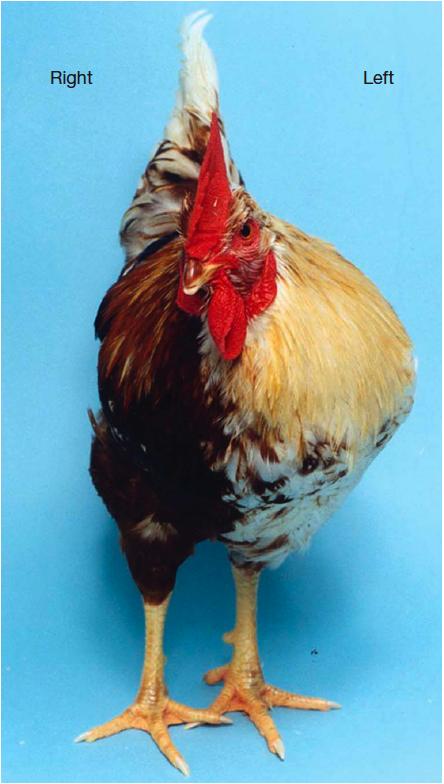
That's one wierd-looking chicken! - Bilateral gynandromorphism
Tuesday, 24 April 2012
Ancient virus DNA thrives in us

Traces of ancient viruses which infected our ancestors millions of years ago are more widespread in us than previously thought.
A study shows how extensively viruses from as far back as the dinosaur era still thrive in our genetic material. It sheds light on the origins of a big proportion of our genetic material, much of which is still not understood.
The scientists investigated the genomes of 38 mammals including humans, mice, rats, elephants and dolphins.
The research was carried out at Oxford University, the Aaron Diamond AIDS Research Centre in New York and the Rega Institute in Belgium.
It is reported in the journal Proceedings of the National Academy of Sciences.
One of the viruses was found to have invaded the genome of a common ancestor around 100 million years ago with its remnants discovered in almost every mammal in the study.
Another infected an early primate with the result that it was found in apes, humans and other primates as well.
The work established that many of these viruses lost the ability to transfer from one cell to another.
Instead they evolved to stay within their host cell where they have profilerated very effectively - spending their entire life cycle within the cell.
Forced choice The researchers found evidence of the viruses multiplying so extensively within mammals' genomes that they have been compared to an outbreak of disease.
The senior author of the study, Dr Robert Belshaw from Oxford University's Zoology Department, said: "This is the story of an epidemic within every animal's genome, a story which has been going on for 100 million years and which continues today.
Continue reading the main story
“Much of the dark matter in our genome plays by its own rules”
Gkikas Magiorkinis Oxford University
"We suspect that these viruses
are forced to make a choice: either to keep their 'viral' essence and
spread between animals and species. Or to commit to one genome and then
spread massively within it."
The study shows that the viruses involved have lost a gene called Env, which is responsible for transmission between cells. Known as endogenous retroviruses, these micro-organisms have gone on to become 30 times more abundant in their host cells.
The study is one of many attempting to understand the full complexity of the human genome.
Astonishingly, only 1.5% of the genetic material in our cells codes for human life. Half of the rest is sometimes described as "junk DNA" with no known function, and the other half consist of genes introduced by viruses and other parasites.
Positive services According to the lead author, Dr Gkikas Magiorkinis, "much of the dark matter in our genome plays by its own rules, in the same way as an epidemic of an infectious disease but operating over millions of years.
"Learning the rules of this ancient game will help us understand their role in health and disease."
This raises the extraordinary scenario of our DNA serving as an environment in which viruses can evolve - a micro-ecology within the double-helix of our genetic material.
There is evidence that they can provide positive services. For example the protein syncytin - derived from a virus - helps develop the placenta.
Dr Belshaw says that endogenous retroviruses (ERVs) are not known to have any obvious or direct health effects.
"But there could be effects we're not picking up on or things we could even take advantage of if we detect ERVs moving around or expressing proteins as a result of cancer or infection."
The study was supported by the Wellcome Trust and the Royal Society.
Source: http://www.bbc.co.uk/news/science-environment-17809503
Subscribe to:
Posts (Atom)